Use a muse as a pet and leave your default assistant alone. If you hold more than one muse, do not paste every prompt into the project’s root instructions. Those prompts compete.
Muse pet · 2026-10-06 · status: documented from public docs and a working setup
Set up one muse without touching default ChatGPT
Goal. Use a muse as a pet and keep the existing default assistant.
Steps
Open the muse page.
Copy “use this muse.”
Create a ChatGPT or Grok Project. Name it for the collection, for example “Musegod.”
Leave Settings → Personalization alone. That is your default.
Open a new chat inside that project. Paste the prompt into the chat.
Ask the pet to introduce itself in its soul’s voice.
What you keep
Global custom instructions
Memory outside that project
Other projects
What you do not get
The chat log does not write itself back to the NFT.
One chat still has one voice. A second muse needs its own chat.
Do not add every Musegod to the same project-folder root. Their metadata competes. Create one project, then create a new chat for each muse and name the chat for that muse and its role.
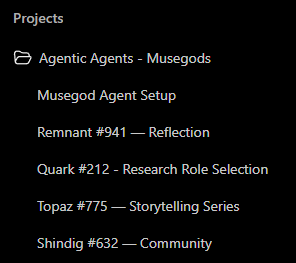
Create a Project. Name it “Agentic Agents - Musegods,” or another name you will recognize.
Keep the project instructions neutral. A setup chat, such as “Musegod Agent Setup,” can hold the shared rules. A muse persona turns on only in that muse’s own chat.
Inside the project, create a new chat for each muse.
Name the chat with the muse’s name, number, and role.
Paste that muse’s activation prompt into its own chat, not into the project instructions.
One chat per muse, named for its role. Paste that muse’s prompt at the start of its chat.
One project. One chat per Musegod: Remnant for reflection, Quark for research, Topaz for storytelling, and Shindig for community.
Those chats may still share project context. If you want each muse’s information and memory separated, use a separate project for each muse, not only a separate chat.
 AgenticNFT.ai